
Auracast Broadcast Audio: What Commercial Audio Installers Need to Know

About Author: Kevin Wu
Founder & Principal Audio Engineer, LECOVITA
Specialize in acoustic engineering, high-fidelity speaker and amplifier design, precision manufacturing, sonic innovation, immersive audio solutions, and premium audio system development.
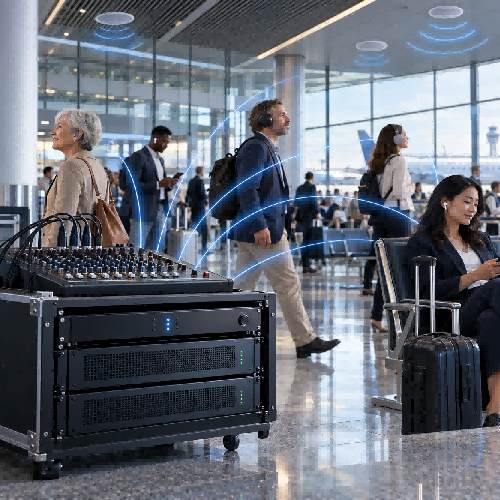
Table of Contents
- What Is Auracast Broadcast Audio?
- How Does an Auracast System Work?
- Auracast Is Not the Same as Ordinary Bluetooth Pairing
- Five Commercial Applications for Auracast
- How Auracast Fits Into a Commercial PA System
- Public and Private Broadcasts
- Design Questions Installers Should Ask
- Common Misunderstandings
- Final Recommendation
- FAQ
Auracast Broadcast Audio: What Commercial Audio Installers Need to Know
Quick answer: Auracast™ broadcast audio allows one compatible Bluetooth transmitter to send audio to an unlimited number of compatible receivers within range. In commercial venues, it can deliver PA announcements, TV audio, translated content or assistive-listening audio directly to visitors’ earbuds, headphones and hearing devices.
Auracast does not replace the building’s loudspeaker system. In most projects, it works as an additional listening layer alongside the conventional PA or distributed audio system.
What Is Auracast Broadcast Audio?
Auracast broadcast audio is a feature of Bluetooth LE Audio. Unlike traditional Bluetooth audio, which commonly creates a one-to-one connection between two devices, Auracast uses a broadcast model.
A transmitter sends one broadcast signal, and any number of compatible receivers within coverage can join it. Adding listeners does not create additional individual audio connections or require proportionally more transmission bandwidth. Bluetooth® Technology Website
Possible transmitters include:
- Smartphones and computers
- Televisions and media players
- Commercial audio processors
- Public-address systems
- Dedicated Auracast transmitters
Compatible receivers may include:
- Wireless earbuds
- Headphones
- Hearing aids
- Hearing implants
- Speakers and other LE Audio devices
This architecture makes Auracast particularly relevant to airports, conference centers, universities, cinemas, gyms, museums, houses of worship and other public locations.
How Does an Auracast System Work?
An Auracast system consists of three functional roles.
| Component | Function |
|---|---|
| Auracast transmitter | Encodes the audio and transmits the broadcast, its name and configuration information |
| Auracast assistant | Scans available broadcasts and lets the user select one |
| Auracast receiver | Receives and plays the selected audio stream |
The assistant may be a smartphone, smartwatch, hearing-aid remote or another compatible control device.
The process resembles selecting a public Wi-Fi network:
- The transmitter starts broadcasting audio and advertising information such as the broadcast name, content and codec configuration.
- The assistant scans for available broadcasts and displays them to the user.
- The user selects a broadcast.
- The assistant gives the receiver the information required to join.
- The receiver plays the selected audio stream.
The assistant and receiver do not necessarily have to be the same physical device. For example, a smartphone may discover and select the broadcast, while compatible hearing aids reproduce the audio. Bluetooth® Technology Website
Auracast Is Not the Same as Ordinary Bluetooth Pairing
Traditional Bluetooth audio is usually designed around a direct connection between a source and a receiving device. Auracast instead behaves more like radio broadcasting.
One transmitter sends the same signal regardless of whether one person or hundreds of people are listening. The transmitter does not maintain a separate connection with every receiver.
This offers several benefits for commercial AV:
- No conventional one-to-one pairing for every visitor
- No increase in transmitter connections as more listeners join
- Direct audio delivery to personal listening devices
- Support for multiple broadcast streams
- Easier access to different languages or content channels
- Better integration with compatible hearing devices
However, Bluetooth 5.2 alone does not guarantee Auracast support. A product must implement the necessary Bluetooth LE Audio features and the Public Broadcast Profile. Existing products may also require new hardware rather than only a firmware update. Bluetooth® Technology Website
Five Commercial Applications for Auracast
1. Public-Address Announcements
Airports, railway stations and other transportation facilities can distribute announcements through ceiling speakers while simultaneously broadcasting them to compatible personal listening devices.
This can help visitors hear boarding information or emergency messages in noisy environments.
In February 2026, Frankfurt Airport began testing Auracast broadcasts at selected gates in Terminal 1. Gate announcements could be received through compatible hearing aids, earbuds, headphones or smartphones. Bluetooth® Technology Website
2. Silent Television Screens
Gyms, waiting rooms, airports and sports venues often operate several televisions without audible sound.
An Auracast transmitter connected to each source can allow visitors to select the desired screen and listen through their own compatible devices without increasing the ambient noise level.
3. Assistive Listening
Auracast can supplement the installed sound system by sending a direct audio feed to compatible hearing devices.
The Bluetooth SIG identifies augmented and assistive listening as a major public-location application, including airports, cinemas, lecture halls, conference centers and houses of worship. Bluetooth® Technology Website
The direct signal can reduce the effect of distance, room reverberation and surrounding noise, although the final experience still depends on system design, radio coverage and receiver compatibility.
4. Multi-Language Audio
A conference can broadcast separate language channels so attendees can choose their preferred interpretation stream.
This may reduce the need to distribute and collect dedicated infrared or RF receivers, although venues should maintain a suitable accessibility and compatibility strategy during the transition period.
5. Museums and Guided Tours
Museums, exhibitions and tourist attractions can broadcast guided content to visitors’ compatible earbuds or hearing devices.
Separate broadcasts can be used for different languages, exhibition zones or tour groups.
How Auracast Fits Into a Commercial PA System
Auracast should normally be treated as an extension of the installed audio system.
A typical signal path may be:
Microphone or media source → mixer/DSP → power amplifier and installed loudspeakers
At the same time, a line-level or digital feed from the mixer/DSP can be routed to an Auracast transmitter:
Mixer/DSP output → Auracast transmitter → visitors’ compatible receivers
The conventional 70V/100V distributed speaker system continues to provide room-wide coverage. Auracast provides an optional personal listening path.
This hybrid approach is important because not every visitor currently owns a compatible receiver, and the main PA system may still be required for general announcements, background music and emergency communication.
Public and Private Broadcasts
An Auracast broadcast can be publicly discoverable while access to its audio may be open or protected, depending on the implementation.
Open broadcast
An open broadcast can be discovered and joined by compatible users within range. It is suitable for:
- Public announcements
- Silent television audio
- Public tours
- General assistive listening
Protected broadcast
A protected broadcast requires the receiver to obtain the correct broadcast code. It may be more suitable for:
- Private meetings
- Paid events
- Restricted tours
- Internal company communications
A protected broadcast should not be treated as a complete information-security system without reviewing the entire product implementation and project requirements.
Design Questions Installers Should Ask
Before specifying an Auracast system, confirm:
- What audio source will feed the transmitter?
- Is the broadcast public or protected?
- How many separate language or content streams are required?
- Which earbuds, headphones and hearing devices must be supported?
- How will users discover and select the broadcast?
- Will QR codes or location signage be provided?
- What radio coverage is required?
- Are multiple transmitters needed for the venue?
- How will adjacent broadcasts be named and distinguished?
- Is a conventional PA or assistive-listening system still required?
- How will the system be monitored and maintained?
- Does the product qualify for use of the Auracast trademark?
Products marketed with the Auracast trademark must meet the applicable Bluetooth qualification and trademark requirements. Public venues should also review Bluetooth SIG guidance concerning location registration and branding. Bluetooth® Technology Website
Common Misunderstandings
“Every Bluetooth 5.2 product supports Auracast.”
Incorrect. Bluetooth 5.2 introduced necessary underlying features, but the product must also implement the relevant LE Audio and Public Broadcast Profile functions.
“Auracast completely replaces installed speakers.”
Usually not. It is best considered an additional personal-audio channel alongside the main loudspeaker system.
“Any smartphone can scan and receive Auracast.”
Compatibility depends on the phone’s hardware, operating system, software implementation and role within the system.
“More listeners require more transmitter bandwidth.”
Auracast sends a true broadcast signal. The transmitter does not create an individual stream for each listener.
“A firmware update can add Auracast to every existing device.”
Not necessarily. Some products may be upgradeable, but others require compatible Bluetooth hardware and therefore need a hardware redesign.
Final Recommendation
Auracast broadcast audio is moving from demonstration projects into real public installations. Its strongest commercial value is not simply wireless music sharing—it is the ability to connect public audio sources directly to visitors’ personal listening devices.
For audio manufacturers and system integrators, the practical opportunity is to develop amplifiers, DSP products and transmitters that combine conventional installed-audio outputs with qualified Bluetooth LE Audio broadcast functions.
A well-designed commercial system should preserve reliable loudspeaker coverage while adding Auracast as an accessible, selectable and scalable listening channel.
FAQ
Can an unlimited number of people listen to one Auracast broadcast?
According to the Bluetooth SIG, an unlimited number of compatible receivers within range can join because the transmitter sends one broadcast signal rather than creating an individual connection for each listener.
Does Auracast require Bluetooth 5.2?
It requires features introduced in Bluetooth Core Specification 5.2, together with the applicable LE Audio and Public Broadcast Profile implementation. A Bluetooth 5.2 label alone does not confirm support.
Can Auracast carry more than one language?
Yes. A system can provide multiple audio streams or broadcasts, subject to transmitter capabilities, configuration and available radio resources.
Can Auracast work with a 70V/100V PA system?
Yes. A mixer or DSP can feed both the conventional amplifier system and an Auracast transmitter, allowing loudspeaker coverage and personal listening to operate together.
Is Auracast useful only for people with hearing loss?
No. Assistive listening is a major application, but the technology can also deliver silent-TV audio, public announcements, tour content and simultaneous interpretation to compatible consumer earbuds and headphones.
